


Free SSL from Let's Encrypt: the pros and cons
This article is 8 years old — prices and terms may have changed.
Free Let's Encrypt SSL certificates are now available in the control panel to every customer of our shared hosting service. What they are, why they are free, which sites they suit and how they can be installed — you will learn from this article.
Search engines and browser developers do everything they can to encourage webmasters to install SSL certificates on their sites. And rightly so, because transmitting data between servers over HTTP is unreliable and attackers can intercept the passwords, e-mail addresses, phone numbers and other data being sent.
To speed up the adoption of SSL, Google's search robots began lowering the positions of sites without SSL in search results last year, while the Mozilla Firefox and Google Chrome browsers mark them as insecure. So site owners need to install SSL certificates on their sites.
What an SSL certificate is and what it is for
 SSL is a protocol, that is, a set of rules by which information is encrypted and transmitted between servers over a secure connection.
Establishing such a connection requires several special files, and those are what is called an SSL certificate.
Certificates come in different kinds:
- with domain validation — these suit personal sites and small blogs;
- with organisation validation — used for online shops and social networks;
- with extended validation of documents — for large companies, banks, investment funds and so on.
Depending on the complexity of the checks, browser support, the level of trust and other factors, the cost of certificates varies. However, the owners of small internet projects are not always ready to spend money on a security certificate. And it is precisely for such cases that certificates from Let's Encrypt exist.
A little history
 Let's Encrypt is a non-profit trusted certification authority that offers SSL certificates free of charge. Certificates are issued automatically.
The authority was created in 2014 so that most sites on the internet could move to the secure HTTPS protocol.
The project is sponsored by companies such as Mozilla, Google Chrome, Cisco and Facebook. Although the project is non-profit, it uses the most modern methods of data encryption, so certificates from Let's Encrypt are trusted.
Until this year Let's Encrypt did not issue wildcard certificates; since 13 March such certificates have finally become available to users.
That means it is now possible to issue one certificate for your domain and protect every subdomain of the third level and below.
Who will Let's Encrypt SSL certificates suit?
 Let's Encrypt issues entry-level certificates with domain validation. They suit personal blogs, forums, portfolios and landing pages.
Such a certificate confirms that the domain belongs to the site's owner, but no check of a company's registration is carried out. The visitor will see no message about a suspicious site, and attackers will not be able to intercept the data entered on it.
However, such certificates are not recommended for the sites of small and medium businesses; to raise users' trust in those sites there are certificates with organisation validation.
And a state enterprise, a bank or a large online shop needs an SSL certificate with extended validation of documents.
Next let us look at the pros and cons of Let's Encrypt certificates.
The pros and cons of Let's Encrypt certificates
Pros
 They are free
That is a substantial advantage for site owners who cannot afford a paid certificate yet want to give their visitors a secure connection.
Let's Encrypt asks for no money either for installing or for renewing a certificate. If you want to, you can make a donation on the project's site.
Automatic issuing of certificates
You can let the Let's Encrypt client download, install and renew certificates on its own. But if you are worried about your server's configuration, you can do it manually.
Reliability and security
The fact that Let's Encrypt SSL certificates are free does not mean their level of encryption is lower than that of paid certificates. Let's Encrypt keeps to the highest standards of encryption and offers certificates of a high level of reliability.
As for the drawbacks of these certificates, they have to be taken into account as well.
Cons
 No extended checks
When a certificate is issued, only the domain's ownership by the client is checked. So anyone on the internet can create a certificate with the name of any organisation and pretend that the site has something to do with it.
Certificates are issued for just 90 days
That is more of an inconvenience for users than a substantial shortcoming of the certificate. By issuing a certificate for just 90 days rather than a year, Let's Encrypt tries to limit the damage from keys and certificates issued by mistake. Over a shorter term of validity such certificates do less harm than they would over a year.
Compatibility problems
Let's Encrypt certificates are not compatible with early versions of Windows XP. Besides that, compatibility problems may arise with old versions of mobile software. To make sure there will be no problems with your operating system or mobile firmware, check whether they are in the list of compatible devices and programs on the Let's Encrypt site.
There is no customer support
On the Let's Encrypt site you will find no chat and no telephone support, only technical documentation in English. Some questions about these certificates are discussed on relevant forums, and answers to the questions you have can be found there.
No guarantee and no monetary compensation
Unlike commercial certification authorities, Let's Encrypt provides no guarantees. If a certificate is compromised, or somebody loses money because of a certificate issued to a fraudulent site, the losses will not be reimbursed.
How to install one
Ordering and installing a Let's Encrypt certificate is very simple. It takes a few easy steps in the ISPmanager control panel:
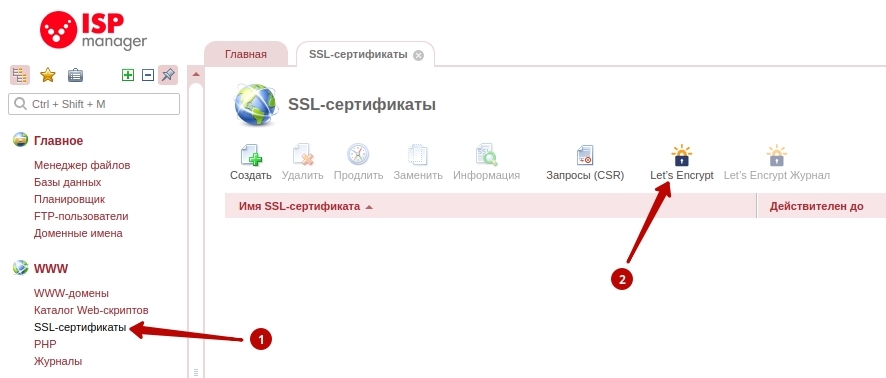
In the panel's SSL certificates section, click the Let's Encrypt button:
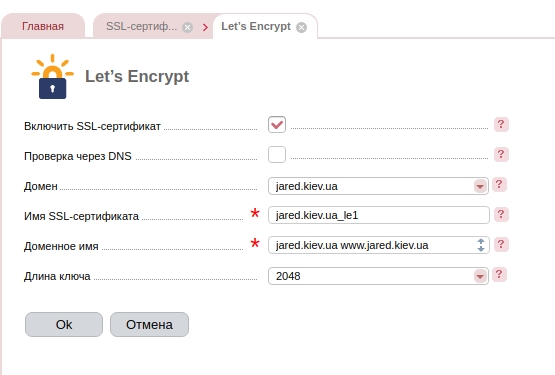
Check the certificate's parameters and click OK.
That is all — the certificate is installed and ready to work.
Drawing conclusions
 Before installing a free SSL certificate from Let's Encrypt, the pros and cons have to be weighed.
If this kind of certificate suits you, the drawbacks do not apply, and the only question is whether to install a free certificate or none at all, then the best decision is to install it after all.
On the other hand, the cost of commercial certificates is low nowadays, and you can order a certificate for a year, with a guarantee and good browser compatibility, for a price comparable to that of a domain.
If you have not yet installed an SSL certificate on your site and Let's Encrypt certificates do not suit you, you can read about SSL certificates on our service page and choose the one that best suits your project.
Images from Freepik.com