


WooCommerce, OpenCart or PrestaShop: what to choose for an online shop
This article is 5 years old — prices and terms may have changed.

The productivity and convenience of an online shop depend on the CMS the site runs on. WooCommerce, OpenCart and PrestaShop are among the five most popular CMSs for online shops.
Which of the three engines should you choose for your shop? Let us look at the main parameters of each.
All three platforms are permanently at the top of the ratings, and these CMSs are particularly recommended for a quick start in e-commerce. In this article we compare the three and try to work out which is better.
The main criteria will be:
- the choice of theme for the design;
- ease of use;
- performance;
- how convenient they are to work with afterwards.
Price and the associated costs of use
All three CMSs are free. It is enough to install one on your hosting to start building a site. Only the hosting and the domain will cost money, and you can order both from us. We offer solutions for WordPress sites and other CMSs.
Plugins for sites on any of these CMSs can cost money too. But that item of spending is not compulsory: most paid components have free alternatives.
Functionality
Now let us look at what each CMS can do.
WooCommerce
The WooCommerce plugin in its basic configuration will create an online storefront for selling digital and physical goods. It will also create promotional codes for discounts, and coupons. These are fairly simple functions, but they are complemented by a wide choice of plugins for WooCommerce.
The screenshot shows more than 7000 free components in the WordPress catalogue.
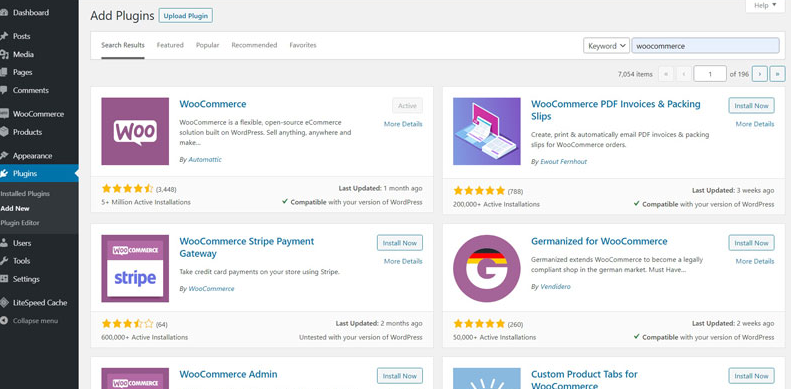
The functionality can be extended further still with paid plugins. With them you can also build:
- b2b sites;
- booking services;
- marketplaces;
- subscription services and clubs.
It matters to install plugins thoughtfully and with an understanding of what they do. The main thing is not to overload the site.
OpenCart
This CMS probably has the largest number of functions available out of the box. Install it and you will be able to:
- create gift cards, discount coupons and loyalty programmes;
- launch and manage affiliate programmes for the shop;
- sell goods with prices given in several currencies;
- translate the site into one of 40 languages;
- set up recurring payments;
- sell digital goods.

Plenty of extensions are available for OpenCart. Many of their functions would cost money on other CMSs, which is a serious advantage for OpenCart. The plugin catalogue holds both paid and free tools for a shop on this CMS.
PrestaShop
This CMS sits between the previous two. Out of the box, what PrestaShop can do goes beyond WooCommerce, but falls well short of OpenCart.
The system will build a very convenient online storefront. Beyond that, though, the CMS does not offer especially wide functionality. Fortunately there is a large choice of plugins: the catalogue holds more than 4000 modules with a broad range of capabilities.

There are tools here for on-site SEO, for marketplace functionality and more.
A serious drawback is that most of the plugins are paid, costing anywhere from a few dollars to a few hundred. There are few free plugins on the official PrestaShop marketplace, though plugins can be found outside it as well.
Choosing a theme for your site
One of the serious advantages of WooCommerce is the wide choice of paid and free themes. The WordPress library holds more than 1000 free themes alone, and free themes can be found in other developers' catalogues too.
Premium options can be found on marketplaces such as themeforest.net, or ordered directly from developers if for some reason you are after a bespoke solution.
OpenCart offers a far narrower choice here. Only 17 different themes are available on the OpenCart marketplace. There are many more options on other platforms — on themeforest.net, for instance, you can choose from 800.
PrestaShop offers a very wide choice of themes: more than 3000 options on the official marketplace. All of them are paid, but the prices are relatively modest, starting at 50 USD. There are themes available outside the official marketplace as well.
Compatibility with payment systems
WooCommerce supports practically every payment system on the market. Integration goes through plugins, built either by the payment systems themselves or by third parties.
Many payment gateways are free — Stripe, PayPal, AmazonPay and others belong to that category. There are paid solutions as well, starting at 79 USD.
OpenCart offers the largest choice of payment gateways, 30 of which are installed at CMS level. All the most popular payment tools integrate with OpenCart easily. Working with this CMS, you will be able to take payments through PayPal, Stripe, Klarna, Amazon Pay and more.
PrestaShop is very much like WooCommerce here. Modules such as PayPal, Stripe and Klarna are free, while Worldpay and SagePay have to be paid for and cost around 90 USD.
Support
All three platforms are open source, which means they cannot have the kind of support a paid service does. But a community has formed around each of them that helps solve technical problems.
WooCommerce uses a ticket system for anyone who wants to get in touch directly, and answers come fairly promptly and in detail. On the community forum you can not only ask questions but see whether someone else has been looking for the same information.
Thanks to the popularity of WordPress and WooCommerce, it will be easier for you to find information on working with this platform, both on the official forum and elsewhere.
The main technical support tool for anyone who has chosen OpenCart is the community forum. It is fairly active too, so before starting a new thread it is worth searching for a question like yours. Note also that along with an answer, some developers on the forum will try to sell you a service.
PrestaShop offers more support options than its competitors. You can not only read the documentation or post a request on the forum: there is also the option of subscribing to paid support plans, which is rather unusual for an open-source CMS.
Performance figures
Comparing CMSs on performance is harder than comparing e-commerce site builders. The reason is obvious: every online shop built on a single builder sits on the same hosting, while sites on the same CMS may sit on hundreds of different hosts.
Any online shop needs powerful hosting to run reliably and productively. And if yours is a large e-commerce project, take a look at VPS servers from Host4Biz. We will provide security, availability and high uptime for your sites.
Using them: simplicity and functionality
For the full picture, let us break the assessment down into the different stages of working with a site and comment on each.
Getting started
Installing any of these CMSs on hosting is fairly simple, and the script installer Host4Biz offers makes the task easier still. But what awaits a user once the CMS is installed?
Since WooCommerce is a plugin for WordPress, you first have to install the WordPress CMS and then the WooCommerce plugin. Once the plugin is installed, you go through a short setup wizard. Follow the instructions so that everything works correctly.
OpenCart offers no setup wizards or guides after the software is installed, which is not great. There is a getting-started guide in the documentation, but you will have to find it yourself.
PrestaShop beats its competitors at this stage: the first time you sign in you are met by Preston the Penguin, who takes you through a short but detailed tour of the platform. After that a pop-up appears with options such as watching tutorial videos, going to the documentation or visiting the support forum.
Navigating the control panel
WooCommerce. The WordPress dashboard is one of the simplest to use, and the WooCommerce plugin fits into that logic neatly without complicating the work.
After installation, two new sections appear in the left sidebar: the first is the main WooCommerce section, where you manage orders and reach the plugin settings, and the second is where you manage your products and categories.
Both main sections hold a list of well-labelled subsections, and because the plugin is lightweight you are not confronted with a mass of options — which makes navigating WooCommerce more convenient.
OpenCart. The control panel in this CMS is well thought out and holds most of the important sections. Most tabs are easy to find.
Unfortunately some sections, such as payment gateways and delivery options, turned out to be quite hard to find. That is a noticeable minus in the assessment, because it complicates setting up and filling in information that matters to a shop's customers.
PrestaShop probably has the best control panel of the three, and it really is easy to find your way around. Every section you need is there and clearly labelled. It is hard to imagine anyone getting lost among the functions of the PrestaShop admin panel while getting to know the platform.
Configuring the theme
One of the functions that WooCommerce and WordPress handle excellently is theme configuration. The WordPress customizer is one of the simplest tools for changing the layout and appearance of your site, and the number of parameters in it depends on the theme you use.
Some themes, such as WooCommerce Storefront, come loaded with options that make it simple to shape the appearance to your preferences. You can also take advantage of a page builder and of the new Gutenberg editor for creating pages. Plenty of templates from Envato and other developers are available, and with them a coherent shop design comes together quickly.

The customizer will also show you how a page will look on different devices.
OpenCart. Configuring an OpenCart theme is not the simplest of tasks. Some premium theme developers have built customisation tools of their own, which make life considerably easier, but if you plan to use a theme without such tools you risk spending a great deal of time on it.

To make practically any change to an OpenCart theme you have to alter it in code, and if you do not know PHP that is not easy. OpenCart takes a serious minus on this point.
PrestaShop is a little better than OpenCart when it comes to customisation. There are many parameters you can change straight from the dashboard, but the range is very limited. Many developers have included a customizer in their themes, giving you the ability to change the main parameters of the theme and its appearance.

If you have a developer, or know your way around code, you can export a theme, make changes to it and then upload and run it as a child theme — but that is clearly not the simplest or cheapest solution.
Adding and managing stock
Being able to manage your stock simply and efficiently is an important part of running an online shop. The process can be split into three parts:
- Adding products.
- Organising your products.
- Managing stock levels.
WooCommerce. Adding a new product in WooCommerce is a simple process and it all happens on one page. One thing to watch carefully is where the descriptions appear on the page: the main description is the block of information shown below the images and the details of your product, while the short description is what appears beside the product's main image.

Adding categories and subcategories is not hard to work out either, which makes it possible to assemble a product catalogue that is convenient to use.
You can also manage your stock straight from the product page using quick edit. There you will find a menu with many different options, stock quantity among them — excellent for updating quantities quickly.
OpenCart. Adding a new product in OpenCart is a more complicated and lengthier process than in WooCommerce, as the number of sections to work through makes clear. Just look at the screenshot below.

The same goes for adding a new category, although there are far fewer sections than for products. On the whole, organising products into categories and subcategories is fairly convenient here as well.
Managing stock, however, is a rather tedious process: you have to go through the catalogue and edit the quantity for each product separately. That can clearly take a long time if you have a lot of goods.
PrestaShop uses a tabbed layout similar to OpenCart, but the system's developers have cut the number of sections, which makes adding a new product much simpler. There are also plenty of parameters you can set on the first page, such as quantity and price.

Adding a new category happens on a single tab here too, fairly simply and quickly. You can create brand pages to give your customers an alternative way of searching.
As with OpenCart, you cannot manage your stock straight from the admin panel; it has to be done for each product separately. But you can click the quantity field and land directly in a section that allows a quick update. That is better than what OpenCart offers.
Order management
In its standard build, WooCommerce is not very convenient for managing orders. The status of each purchase can only be controlled in the dedicated order management panel. But add the PDF Invoice and Packing Slip plugin and everything changes.
That plugin prints invoices and packing slips straight from the dashboard, in bulk or individually. In our view it is simply a must with WooCommerce.
OpenCart in its standard configuration is a little better than WooCommerce, since you can print information directly from the order management panel. The problem is that you cannot update order statuses in bulk, which can be very frustrating if your shop has a lot of customers every day. Without installing an extension you also cannot export your orders as CSV.
PrestaShop went the opposite way and gave you plenty of ways to manage your orders. There are separate sections where you can print packing slips, invoices and credit slips, and you choose which to print by date or by order status.
There is one small problem with how PrestaShop generates its invoices and packing slips: the platform downloads the documents to your computer rather than generating them in the browser so they can be printed quickly. There is also no way to export through CSV, which is a noticeable shortcoming.
The ability to update order statuses in bulk is welcome.
Conclusion
On most counts WooCommerce looks the stronger of the three systems.
WooCommerce
In its standard build it is not very good — in fact the capabilities are rather thin. But with a few plugins WooCommerce soon becomes a very convenient e-commerce platform. On it you can build online shops for any kind of goods, prestige items included. One of the big advantages is that the theme and the appearance can be shaped flexibly: almost every parameter can be changed, the colour scheme among them.
WordPress and WooCommerce are very popular around the world, and there is an enormous amount of information and documentation to help you with any difficult task. The basic skills for the platform can be picked up fairly quickly.
OpenCart
It has many excellent functions, but the CMS is not so simple to use, and configuring a theme spoils the overall impression. Many developers hoped OpenCart's creators would solve some of the platform's usability problems, but that has not happened. So we cannot recommend OpenCart to people with minimal experience of running sites.
PrestaShop
PrestaShop is noticeably ahead of OpenCart in many functions and capabilities, since a lot of things here are done very well. The basic set of e-commerce capabilities offers all the tools you need to get started. Theme configuration on the platform is not handled well, though: the number of options available to you is seriously limited.
One of the things that puts people off the platform is that most themes and plugins are paid. That makes building and running an online shop too expensive.
Each of the three CMSs has its advantages. But if your priority is being able to shape the site's appearance and extend its functionality for free, WooCommerce is the better choice. The Host4Biz team will provide reliable, stable WordPress hosting for your shop.
.