


Why is a site not indexed?
This article is 6 years old — prices and terms may have changed.

Let us talk about several kinds of indexing problem and how to identify them.
A sad statistic: on average 15–20% of a site's URLs never reach the index. And those are not technical pages. These are URLs of pages that could perfectly well bring traffic and generate leads and sales.
To that can be added the problems of partial indexing.
Partial indexing is the situation where your URL is indexed by Google but part of the page's content is not, for any number of reasons.
That part of the page may hold a video, an online calculator or another service meant to create additional value for the user.
Bigger sites, more problems
Indexing problems are mostly met by the owners of large sites. The more URLs there are, the higher the chance of trouble. Two striking examples:
- on the Walmart site only 61% of pages are indexed by Google;
- on Yoox.com, a marketplace for stylish clothing, only 19% of pages are.
Shops, blogs and industry portals all run into the problem.
About 20% of the pages on Medium.com never reach Google's index. That is an enormous list of URLs.
A little history. Indexing problems are not only about JavaScript
Partial indexing of content is not a problem that appeared today. In 2017 everything was obvious: Google indexed the part of a page written in HTML and skipped the elements built with JavaScript.
But over time it turned out that this is not the only cause of indexing problems.
More and more sites without JavaScript run into partial indexing. To find the causes, the scale of the problem has to be judged first.
URL indexing
This problem is perhaps the simplest. If your URL is not indexed by Google at all, something has to change urgently.
Why is it called URL indexing? The term "HTML indexing" used to be used instead, but people realised it does not quite capture the substance of the problem.
There are a great many such examples on the Yoox site.
How do you check that a URL is not indexed? Start with search operators. There are several options:
- Use the site: operator and check whether the particular URLs you are having trouble with appear in the results;
- A brand name combined with the site operator. Type the brand name and the site operator into the search box. The results will show whether the site's pages for that brand's products have been indexed.
- A specific query combined with the site operator. The principle is the same. This combination tells you whether pages have been indexed for a particular query.
Partial mobile-first indexing
Indexing, and crawling, in mobile results brings some interesting new problems. Many websites present two separate versions of the content, depending on the device the visitor is using.
That can cause indexing problems on your site. The URL in the screenshot is indexed.
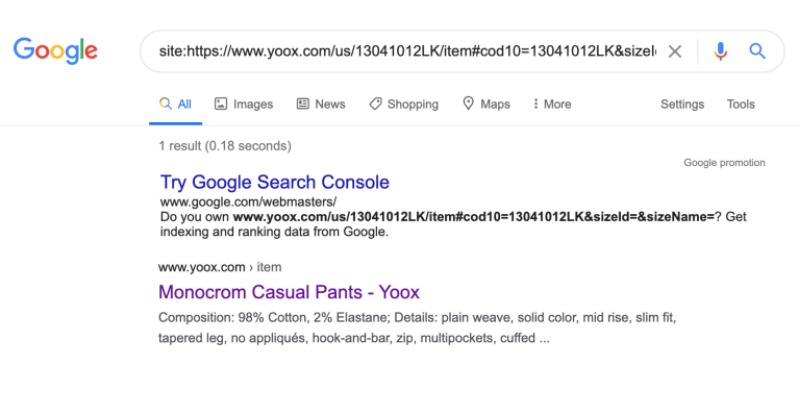
But is it indexed fully? That question is where things get interesting. Let us talk about diagnosing indexing problems. Start by comparing the mobile and desktop versions of the page.
The simplest way is a visual comparison of the two versions of the same page. In the screenshot below, for instance, you will see that a fragment of text is missing from one of them.
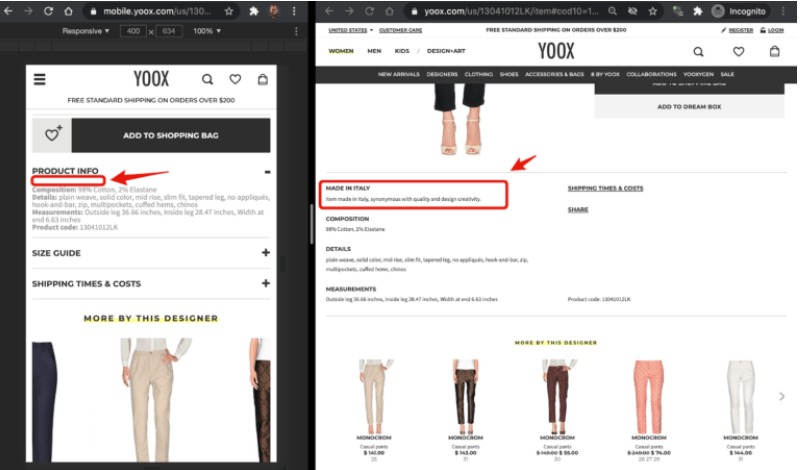
The second option is to use the Diffcheckerservice. It does of course call for the ability to read HTML, but once you are used to it you will find it is not all that hard.
A tip from experience: it is best to put the mobile version in the left-hand window. The difference between the fragments of code is then easier to see.
Within a few minutes you will see the fragments of content that appear only in the desktop version.
To be finally sure a page is only partly indexed, use search operators. Find the fragment that was not indexed and paste it into the search box. Then put it in quotation marks and add the site operator naming the site you are analysing.
If the search engine shows nothing, the site really does have partial indexing problems.
Partial indexing and JavaScript (the most common partial indexing problem)
You will be surprised to see how many websites have a substantial part of their content left unindexed by Google.
Partial JavaScript indexing is the most common and, unfortunately, the most serious indexing problem, because it often affects a page's main content. As a result the URL cannot reach high positions.
Difficulties with indexing most often arise from dynamic content. Look at the Walmart example:
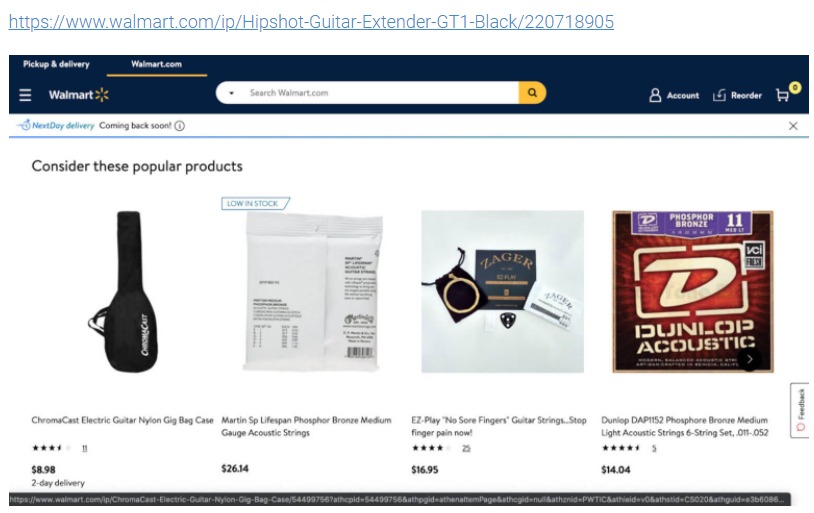
One of the reasons we chose this URL: the JavaScript content loads above the main product, probably because that product is currently out of stock.
The JavaScript content appears in both versions of the URL, but in the mobile one it sits below the description.
How to identify partial indexing caused by JavaScript
First switch JavaScript off in the browser and see which elements of the page do not appear.
All that is left is to see whether Google decided to render and index the JavaScript-dependent content. Simply use the site: operator combined with a heading from the JavaScript block. In the example we are looking at, that is "Consider this popular products".
How do you fix it?
Solving this problem deserves an article of its own; here we describe several options:
- Set up server-side rendering (the preferred solution) or pre-rendering (often not the best solution) of the JavaScript content for search engines.
- Consider optimising the JavaScript responsible for building the section with dynamic content. In Walmart's case that is essential, given all the performance and UX problems — layout shift — that the section creates.
- Think about removing the section entirely. That may seem excessive, but in some cases, if your web development team cannot optimise the section quickly, removing it until they can may be the better solution both for your users and for search engines.
Partial indexing caused by the design
This is one of the more recent discoveries in SEO, indexing and how Google understands your page's layout. Google's staff have in fact confirmed indexing problems caused by layout.
Let us see how the problem of partial indexing caused by layout arises.
Google has limited resources.
The web is flooded with content every day. The problem has become serious enough that Google has to conserve resources in order to keep indexing and ranking valuable content.
Google may skip part of your page in indexing if it is not directly connected with the page's main content.
If your page is about dogs, then from a search engine's point of view it is crucially important to make sure all the valuable content about dogs is indexed. Which means all your "similar products", "you may also be interested in" and so on may be excluded from indexing entirely, since they hold no value for search engines.
As a technical SEO specialist, it is your job to track, diagnose and understand every layout-based indexing problem.
Partial indexing need not always be a bad thing. But often the elements of your page that Google decided not to index were created "for SEO reasons". Those may be:
- Sections linking to new products, for better indexing.
- Every other form of internal linking, "to speed up indexing and crawling".
The data shows that in many cases such decisions do more harm than good, since they are not indexed and make it very hard to obtain crawl data that genuinely reflects your website's structure as Google sees it.
Conclusions
SEO that takes JavaScript into account is still something new and not fully understood.
We hope this article on the connection between rendering and SEO will help you understand the technical side of search optimisation more deeply and build sites that are more convenient and faster, and that both users and search robots take in easily.
Use the particulars of crawling and rendering to your advantage. Apply JavaScript correctly and use reliable hosting from Host4Biz.