


10 tips for your site's security
This article is 11 years old — prices and terms may have changed.

One of the most important problems a site owner faces is security.
Give it less attention than it deserves and there is every chance of a headache in the form of a hacked site. A break-in leads to unpleasant consequences: downtime for the project, lost traffic, damage to the site's reputation and, as a result, lost profit.
Three main problems can be picked out with a compromised site:
1. Mobile and ordinary redirects to external sites. If the visit to an infected site is recorded by the antivirus installed on the user's machine, the reputation of the site they meant to visit suffers.
2. Dynamic links to already infected sites. In every case, once such a link is found the site ends up on Google's blacklist.
3. A static external link to an infected site. Fortunately this problem is simpler and easier to detect than the others.
Research by SiteSecure indicates that search engines do not fully ensure the timely detection of security problems on sites. So the question deserves more personal attention: prevention and monitoring of the site, including not ignoring the installation of antivirus software, using tools that check static links and so on.
There is also a direct relationship between a site's security and the CMS it uses: in 2014 sites on free content management systems were infected with viruses four times more often than sites on commercial platforms.
From which it follows that it is better to use platforms without uncontrolled access to the code.
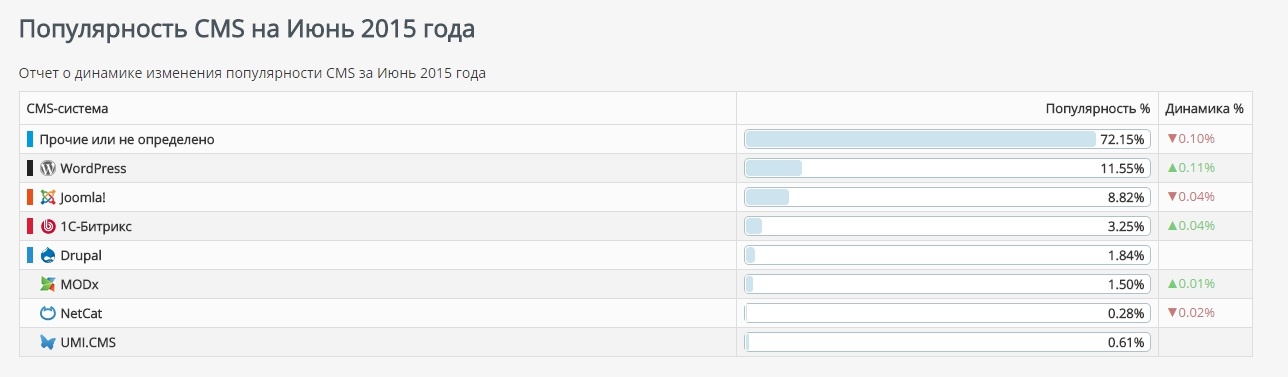
According to the ranking of content management systems for June 2015, the most popular are these:
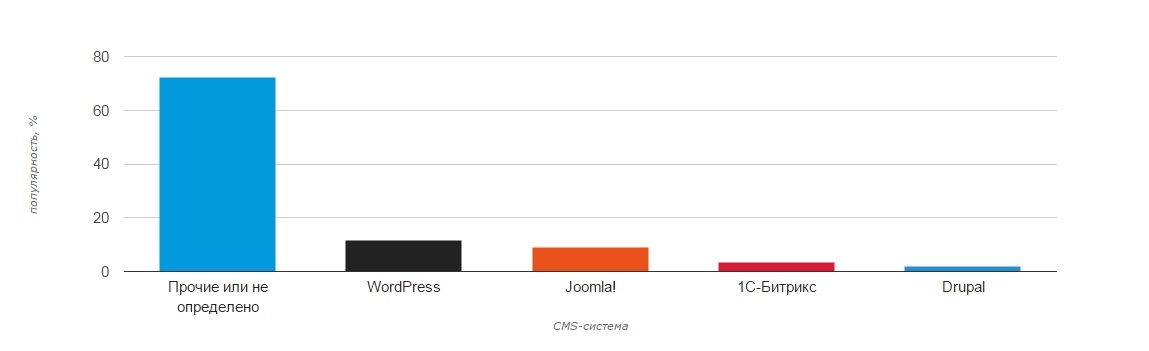
And this is how the popularity of content management systems has changed:
Looking at it from the point of view of security, SiteSecure publishes the following data:
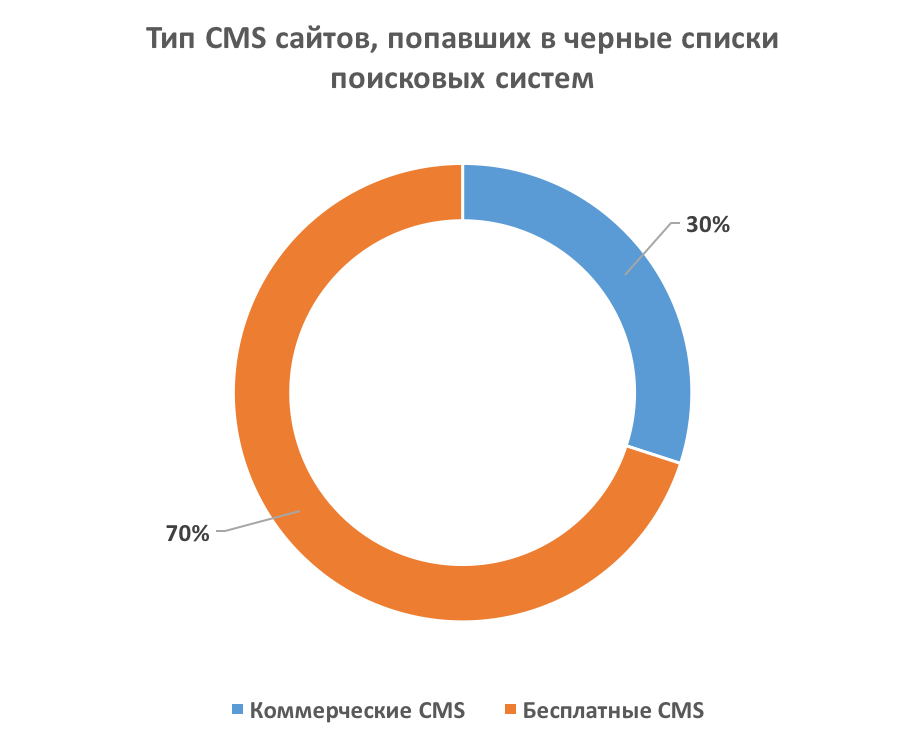
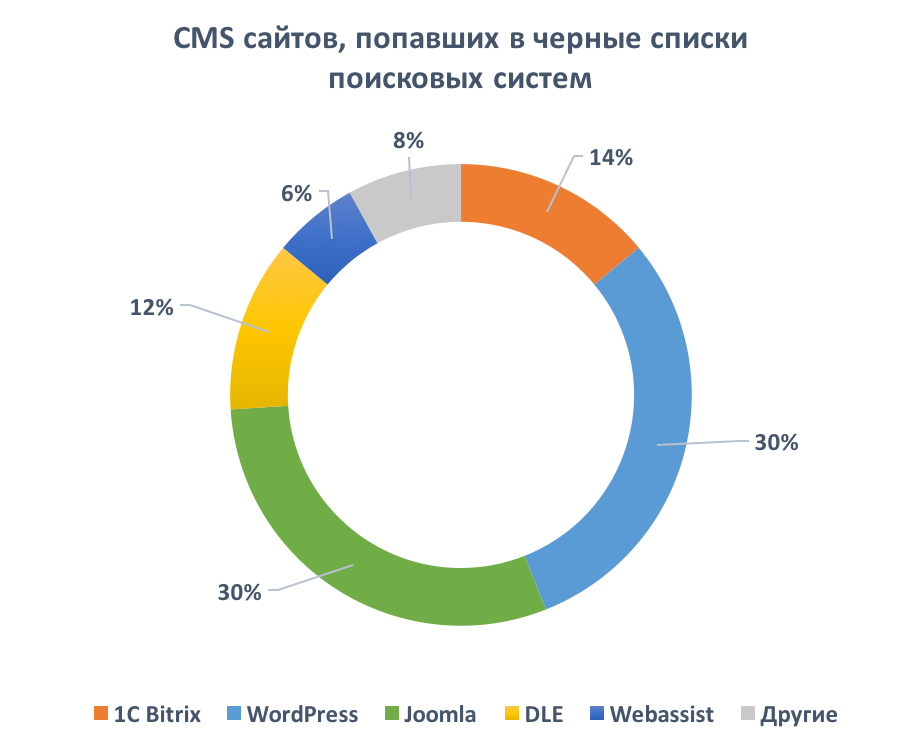
On that basis, sites on paid content management systems can on average be called more secure.
Besides the above, there are other threats to a site's security: weak, easily guessed passwords, uncontrolled access to the site's code, giving access to site management to unvetted staff, most often freelancers, and others.
We have tried to set out general recommendations for observing basic security measures:
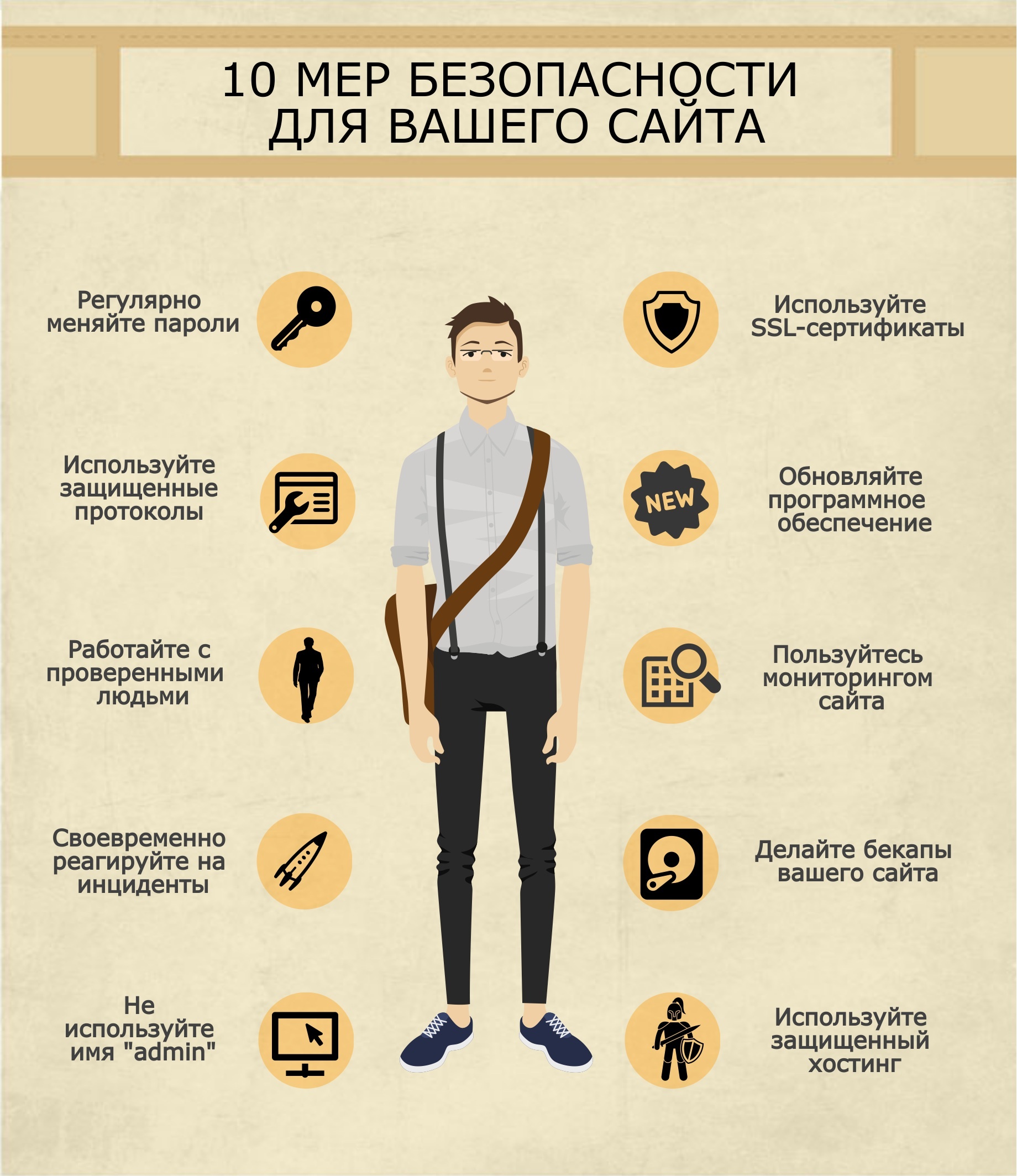
Let us look at each point in more detail:
- Change your passwords regularly. Passwords can be guessed, intercepted on an untrusted network and so on, so it is recommended to change them at least once every two or three months.
Naturally you should not use simple passwords, passwords that match the login, a date of birth and the like. A good password is at least 8 characters long and contains upper and lower case letters and several digits.
- Use secure protocols. For working with a site's files on the server it is better to use protocols protected from interception — FTPS, SFTP, SSH. That way you can be sure the data that reaches the server is exactly what was sent and that nobody intercepted it on the way.
- Work with people you have vetted. You can quite often meet unscrupulous developers who may make a copy of the data for their own needs, insert their code into the body of pages and do plenty of other unpleasant things.
Try to find someone you can trust for work on your site, and even then think before giving them rights beyond those needed for the task.
- React to incidents promptly. If, for instance, your hosting provider has sent a message saying spam is being sent from your account and you certainly did not do it, at least one of the sites on the account has been compromised.
In that case the code of every site on the account has to be checked for changes as quickly as possible — and they need not be recent, since attackers often let malicious scripts lie low after they have been uploaded to the server.
The same goes for any other message about how your site works — they must not be left unattended.
- Do not use the name "admin". Even if you have an excellent password, using standard user names makes an attacker's work at least twice as easy.
Create a separate account with administrative rights for managing the site, and it is better to delete the default user if the CMS allows it.
- Use SSL certificates. An SSL certificate encrypts the data passed between your site and the client's browser, so you can be sure the client's data cannot be intercepted while they work with the site.
An SSL certificate is inexpensive — from $9 a year — yet it raises users' trust in a site and, of late, has a positive effect on the site's positions in search engines.
- Update your software. Vulnerabilities and plain bugs are found regularly in every content management system. That applies especially to free ones — open code is easily available to attackers looking for a programmer's mistakes.
So the content management system and the additional modules for it should be updated as soon as updates are released.
- Use site monitoring. There are plenty of services online offering to monitor various aspects of a site's life — blocking by search engines, virus infection and so on. Do not neglect them, because the sooner you learn about a problem, the smaller its consequences will be.
- Make backups of your site. Statistically, 64% of people back up their data once a year or less often. But when everything was fine with the site yesterday and today the data you need is gone, a copy a year old will not help much. Take care of it in advance; it is not difficult.
For customers of our shared hosting service we make backups ourselves once a day, and for everyone else we offer backup hosting from just $3 a month for 100 GB of space — far cheaper than the cost of recovering data from an old copy or from Google's cache.
- Use secure hosting. It is very bad when one hosting account can reach the data of another, and unfortunately that can be found with some hosts. Our hosting servers are reliably protected from it.
We have gone through the most common site security problems and their solutions. We hope this material has been useful to every site owner.