


Which hosting should you choose
This article is 5 years old — prices and terms may have changed.

In every step-by-step guide to building a website, finding a hosting provider comes almost first. And how your site and your business run depends on the hosting you choose.
The world changed substantially over 2020. The COVID-19 pandemic forced people to stay home more to prevent the virus spreading further, and that led to more use of the internet. Many companies moved their staff to remote work, and schoolchildren and students began studying online. The load on sites grew, because most of people's daily activity had moved into virtual space:
- According to Akamai traffic around the world grew by 30% in the first half of 2020 alone. The trend holds today.
- GlobalWebIndex records that people began spending more time online every day.
- Because of the increased traffic, back in March 2020 YouTube reduced its default video quality.
None of these changes could fail to show up in what site owners expect when choosing hosting.
When we choose hosting for a site, we try to pick the best offer on the web hosting market. Yet we rarely think about what that hosting should actually be like. It is clear enough that the site should run on it… well. Or excellently. But which parameters to look at, and on what principle to choose, is not always clear.
Besides, let us not forget that digital marketing is a very dynamic field where new tools and technologies keep appearing. All of that shows up in sites too, which means the requirements for hosting change as well.
So which hosting should you choose? What should you look at for a site to work really well? That is what this article is about.
The site's security

An attacker puzzled by a site's level of protection
When you ask yourself which hosting to choose for a site, one of the main criteria is the level of security the hosting provider can give it. It is only one item on the list of what makes good hosting, but it is very nearly the most important. Over the past 5 years the number of security breaches has risen by 67%.
Information has long been the most expensive commodity in the world, and the hunt for it goes on across every front. So it matters greatly to protect a site from vulnerabilities, virus threats, break-ins, theft of visitors' personal data and attacks.
A hosting provider can secure your site in several ways:
- by providing a secure connection and protecting users' data;
- by scanning your sites automatically;
- by installing a Web Application Firewall for extra protection.
Now each point in more detail.
A secure connection and protection of users' data
The HTTPS secure connection protocol is the norm.
In July 2018 Google Chrome began marking websites without HTTPS as "not secure". Refusing to move to HTTPS therefore affects a site's ranking badly, and that costs an online business dearly. Using HTTPS, on the other hand, brings many advantages:
- the site takes a higher position in search engines;
- customers' trust in the site grows;
- customers' confidential data is protected.
Sites using the HTTPS protocol are more secure, because the information gathered on them is protected and cannot be stolen.
To use the secure HTTPS protocol, an SSL certificatehas to be installed on the site. Certificates come paid and free. Most hosting providers offer both, and which SSL to choose is always the client's decision. The main thing is to renew the certificate in time, so that the site stays protected.
Automatic virus scanning of a site
Automatic scanning is a compulsory parameter, and worth checking before you choose hosting for a site.
Daily automatic scanning of sites for viruses and vulnerabilities, along with checking the CMS for vulnerabilities, will help avoid the consequences of a virus attack and save the owner a considerable amount of time. They will not have to run checks themselves every day to be sure the site is all right.
Besides, if an attack has already happened and the site needs treating, a virus scanner such as Imunify360will remove every piece of malware from the site in a couple of clicks.
Web Application Firewall — protecting a site from unauthorised access
A Web Application Firewall (WAF) is a security filter for your site. It recognises and blocks attacks on web applications. Even if your site has a brand-new critical vulnerability in its CMS, the WAF will still recognise and block an attacker's attempts to break in or run their own code on it. But that does not remove the need to update the CMS regularly.
If you are choosing a hosting plan for your site and see that the provider uses both a virus scanner and a Web Application Firewall to protect client sites, that is one more reason to choose that company.
Uninterrupted operation

The higher the uptime — the more a hosting provider deserves your trust
The next thing worth looking at when choosing hosting is uptime , the period of uninterrupted operation the hosting gives your site. The higher the uptime, the more reliable the provider is considered, and the less your site will be down.
No hosting provider, of course, can deliver 100% uptime. There is maintenance, there are problems in the data centre and hardware faults that cannot be foreseen. But it is still better to choose hosting with uptime above 99%.
The site's speed

A site's loading speed is a very important parameter
Nobody likes slow sites — neither visitors nor search engines. What pleasure is there, in the twenty-first century, in sitting and waiting for a page to load? So it matters greatly that your site loads as fast as possible and visitors do not wait or leave for other sites.
A Google report shows that 47% of users opening a site wait 2 seconds for it to load. If loading stretches to 3 seconds, the bounce rate reaches 32%. And the longer a user has to wait, the higher the bounce rate.
A site's speed comes from several parameters:
- the bandwidth of the channels;
- the type of hard drives the data sits on;
- the geographical location of the servers;
- and the speed of the site's own engine (which the hosting provider does not affect).
A few words about each point are in order here.
The channel's bandwidth at a hosting provider governs how fast data is transferred. The higher it is, the faster a site loads and works.
Hard drives. Here it is worth noting whether the host uses SSD NVMe drives for its hosting — that is usually stated on the service page as well. Those drives are 5 times faster than ordinary SSDs, so your sites will open and work faster than sites on ordinary SSDs. And as said above, that is what both visitors and search engines like.
The geographical location of the servers plays an important role in a site's speed. The closer a site is to the user, the faster it opens and works. If your customers live mainly in Europe, for instance, the site is better placed on European hosting than, say, in the USA. Cloudflare can of course be used to speed loading up, but it will only speed up static content: images, static pages and so on. Dynamic content — an online shop's product list or a blog's list of articles — has to be generated by the server anew each time. Which means the loading speed of a dynamic site cannot be raised that way.
The speed of the site's own engine does not depend on the hosting provider. A provider does not dictate to clients which platform to build their site on, and different platforms suit different types of site. But if you want to build, say, a simple brochure site or a blog, there is no sense in using CMSs as complicated, heavy and unhurried as Bitrix or Drupal.
WordPress hosting
Hosting for WordPress sites is one of the trends
WordPress is today the most popular content management system in the world. The statistics confirm it.
As we can see, the WordPress CMS is used by 39.9% of all websites, which makes 64.2% of the content management system market:
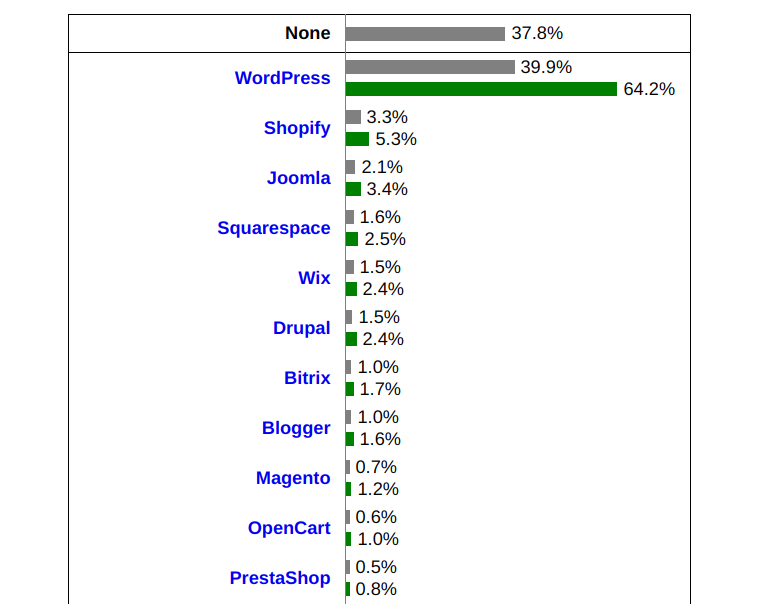
Grey shows WordPress's absolute share of use, green its market share
The platform is most often used for building blogs, personal sites, organisations' sites and online shops. And it is popular enough to have been used for the official site of Mercedes-Benz, the site of Walt Disneyand the well-known technology blog Techcrunch.
Any kind of hosting can be used for WordPress sites — ordinary shared hosting, VPS servers or a physical dedicated server. But the best option is still specialised hosting for WordPress sites.
Using hosting built specifically for WordPress sites will improve a site's speed, performance and reliability considerably.
And if you are only planning to build your site on WordPress, make sure the CMS is already installed on the hosting you choose. Automatic updates for the CMS, plugins and themes, incidentally, make life considerably easier for a beginner (opponents of automatic updates can always switch them off).
Experienced developers will find the extra WordPress functions useful: storing code in Git and managing the site from the command line with WP-CLI, cloning a site, and the SEO Toolkit set of tools for auditing, monitoring and recommendations. So when choosing hosting it is worth checking whether those functions are included in the WP hosting plan.
A website builder
More and more people are moving away from learning a CMS or hiring developers to build a site, particularly where a brochure site or a small resource is concerned. Do-it-yourself website builders are another of the trends.
A website builder should be simple, convenient and intuitive. With it you can build a site simply by placing ready-made blocks however you like. And you need not be a programmer or a web developer, nor spend a mass of time learning some site-building platform.

With a website builder it is easy to create your own site, simply by moving blocks around
But do not confuse the website builder a hosting provider offers with platforms for building sites such as Tilda and Wix. Build a site on a hosting provider's builder and you hold every right to it. If the services of a particular host stop suiting you, you can calmly move your site to another provider. With platforms like Tilda and Wix things are more complicated: your site will be tied to the platform, so you will not be able to move your files to another hosting provider.
Technical support

A hosting provider's technical support should be friendly, attentive and responsive
Attentive support is what every client of a hosting provider looks for. Think back: how often has it happened that your site was down or loading slowly and you had to wait hours for an answer from support? Or worse, you were passed from one member of staff to another because they could not solve your problem. Unpleasant, is it not?
So before ordering hosting and moving a site to it, it is worth talking to the support team. And reading reviews on the provider's site, or on independent review sites, will not go amiss either.
As for our own company, we are simply proud of our specialists. Our clients say they have never had support this attentive, professional and knowledgeable from any host they used before us. Our specialists will always listen, look into the problem and try to solve it as quickly and comfortably for the client as they can.
You may of course think we are boasting. To paraphrase a well-known cartoon, our answer is: "Perhaps we are boasting — but from the bottom of our hearts."
Pricing

Do you always read the terms of a contract carefully?
Hosting providers compete with one another, of course. That shows up in the level of prices, in the number of discounts and bonuses they offer clients, and in the quality of the service.
Ordinary shared hosting is inexpensive, cheaper than virtual servers and far cheaper than physical ones. But when choosing a type of hosting you have to look at the plan's parameters — whether your site will have enough resources. If your site is small and there are not many visitors, you can of course start with the smallest shared hosting plan. But if you have an online shop or a blog with high traffic, it is better to choose a more expensive, more powerful plan.
A site can also be placed on free hosting, but you are unlikely to be happy with how it works, so we would not advise it. The saving may not repay all the problems free hosting can bring.
Before ordering hosting, we advise reading the service contract carefully. It is worth noting whether there is any "small print at the bottom of the page" — and if there is, reading it attentively. Large hosting providers sometimes offer very attractive terms: the first year of hosting for a pittance. But the second and subsequent years may cost several times more, and the terms for terminating the contract can be draconian. It will then be cheaper for you to keep paying, whether you are happy with that hosting or not. So the best option is hosting with transparent contract terms.
It is also worth noting whether the provider offers discounts for ordering hosting for a long term. In that case you can save a considerable amount by ordering hosting for several months, or for several years, at once.
Conclusion
Choosing hosting has become a little harder because of the increased load on the internet. But the main criteria remain the same: security, reliable operation, attentive support and high loading speed.
So to choose good hosting for a site, you need to:
- go to the chosen provider's site and look at the services it offers;
- study the plans — whether the chosen service will have enough resources for your site;
- if you do not have a site yet, note whether the provider offers a website builder;
- study the service contract carefully;
- make sure your site will be well protected;
- talk to the support team — you will decide for yourself how comfortable dealing with them will be.
We hope that after this article it will not be hard for you to choose your hosting.
And we carry on working, and will be glad to see you among our clients.