


What you can do on a VPS?
This article is 11 years old — prices and terms may have changed.

Our customers often ask us to advise them which service to choose — hosting, a virtual server or a dedicated server. We, in turn, ask what tasks the customer needs the hosting for and offer options accordingly.
In this article we have gathered the tasks for which a VPS server is the most convenient choice, and now we are going to tell you about them.
What a VPS is
First of all, it is worth starting with what a VPS is.
A virtual server, VPS (Virtual Private Server) or VDS (Virtual Dedicated Server), is a hosting service for placing sites.
In practice it looks like this: there is a physical server that is "sliced" into virtual servers with a certain set of resources. Each such virtual server emulates a physical machine. But unlike a dedicated server, it is simpler to maintain and far cheaper.
A user can install on their virtual server any operating system and software, delete files and so on.
There can be many such servers on one physical server. They do not interfere with each other and are completely isolated from one another.
How a VPS differs from other kinds of hosting
To compare a VPS with other kinds of hosting, you can picture this scheme:
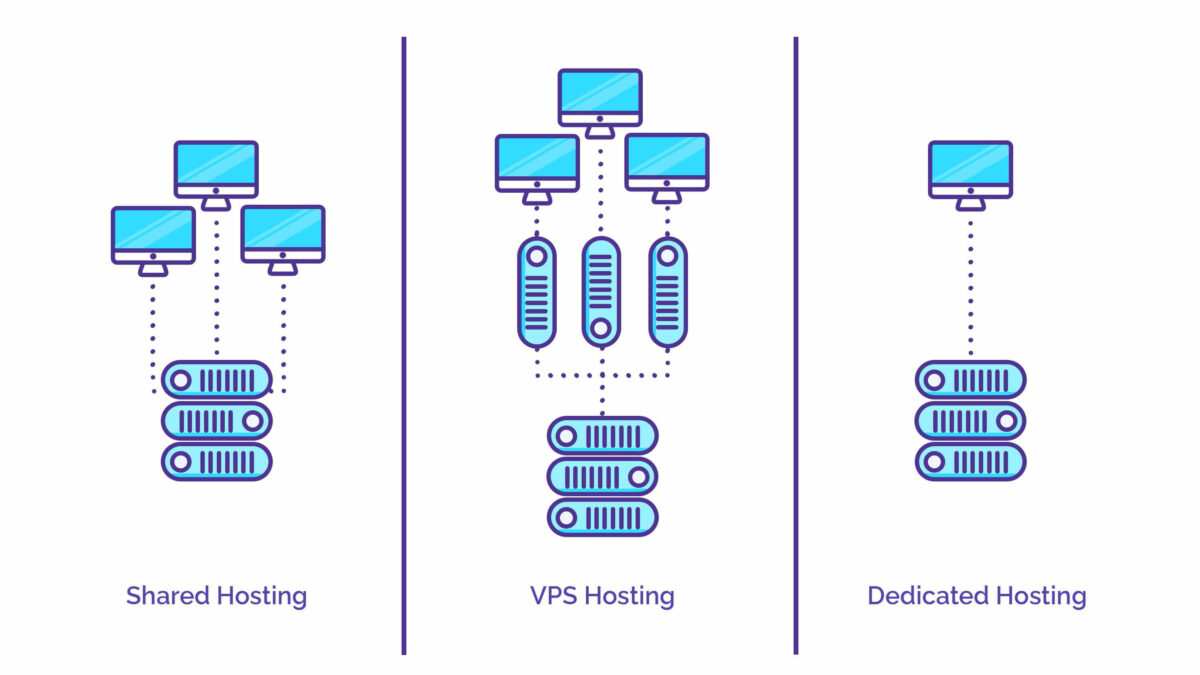 A scheme comparing hosting services: shared hosting — many accounts on one server, VPS — virtual servers on one physical server, dedicated server — given over entirely to the tasks of a single customer.
Shared hosting
Shared hosting can be compared to a place in a dormitory, where you are given a bed, a chair and a bedside table, and you can change nothing but the blanket on the bed.
Besides your account there are many accounts of other people on the server. Such hosting is easy to manage with control panels, which vary in complexity but are for the most part intuitive.
Shared hosting suits uncomplicated, typical sites. For your sites you can change the web server settings and the PHP version, but no more than that. Installing additional software, for instance, is no longer possible. For that you need a virtual server.
Virtual server (VPS/VDS)
A virtual server can be compared to a flat in a block of flats. Just as you rent a flat in a building, here you get an account on a virtual server. As on a shared hosting server, the project has neighbours. They do not affect each other in any way — all accounts are completely isolated from one another, and the amount of resources depends on the plan you choose.
A VPS is a little more complex, as it requires administration skills. On it you can change the software, install the operating system you need and change the settings to your taste.
Dedicated server
A dedicated server can be compared to a private mansion for a site. The whole physical server will be occupied with the tasks of one customer and nobody else's. No neighbours, no other people's accounts, complete freedom of action in terms of settings and configurations.
So a virtual server combines the properties of the two other kinds of hosting. While being a full-fledged projection of a dedicated server, it is easy and convenient to manage on your own.
Which operating systems a VPS can run
That depends on technical limitations, first of all on the virtualisation technology. The resources of a physical server can be allocated to virtual servers in different ways and with different technologies.
For instance, partial virtualisation based on OpenVZ technology allows running virtual servers built on the Linux kernel — Debian, CentOS, Ubuntu and others: this is because all the VPSes use the Linux kernel of the physical server.
KVM virtualisation technology implies full virtualisation and allows running any operating system: Linux, FreeBSD or Windows.
What a VPS is for

VPS servers are used for various tasks — from hosting sites to building a private corporate network
There are many ways to use virtual servers, from hosting sites to building a closed private corporate network.
Let us look at the tasks virtual servers are used for most often.
Hosting sites
When people speak about hosting sites, they most often mean ordinary shared hosting. For a business-card site or an online shop that has only just appeared on the internet even a small amount of resources is enough. But when the site has already grown and attendance has passed 8,000–12,000 people a day, moving from ordinary web hosting to a virtual server becomes a necessity.
In that case the advantages of a VPS over ordinary hosting are obvious.
First, there is no need to share resources with anyone — they are guaranteed. That means a site within a virtual server gets as much RAM, processor cores and disk space as the plan states. Besides, a constant amount of resources makes it possible to plan the load on the site and, if necessary, move to another plan.
Second, the site owner has full access to the server and can set it up to their taste: install a suitable operating system and the software they need, and place all their projects there.
However, one should not forget that managing a VPS server requires an understanding of IT processes. If you do not want your sites to have problems with performance or security, it is better to use the help of a system administrator.
VPN server
There are many situations where a user needs to create a secure connection for transferring confidential information. VPN servers are used for that.
A VPN server (Virtual Private Network) creates a secure channel for transferring data between the user and the server. This channel is encrypted and protected, so no attacker will be able to intercept the data.
This technology is very often used in companies to avoid information leaks.
A virtual server can be set up as a VPN server using OpenVPN technology.
Remote desktop
With a remote desktop on a VPS you can organise a working space for a company's team, work remotely from home or from anywhere in the world.
Sometimes users fear that it will be too slow, but in fact there is no difference in responsiveness. The user does not feel that the data they work with is on a server in another district, city or country. The working process goes just as fast as if they were working at a computer with all the data on it.
A VPS on Windows is very convenient for connecting a remote desktop, as it has the built-in Microsoft Remote Desktop service.
Setting up RDP on a Linux VPS is far more complex, since a Linux VPS has no graphical shell and a large number of additional programs have to be installed and configured.
IP telephony
To deploy IP telephony on a VPS you need to:
- pick a VPS server with a suitable plan;
- order SIP phones;
- choose a number.
The advantages of IP telephony on a VPS are that you can connect the telephony to a CRM system and keep call analytics, control the flow of calls and create an unlimited number of internal numbers.
Software development
A whole team of specialists is usually involved in developing and testing software. Some of them work in the office, some remotely from other cities or countries. So how do you coordinate the work of a development team in the simplest and most economical way?
The answer to that question is a VPS server with a version control system installed. A virtual server gives a mass of advantages:
- staff can join the work at any moment and wherever they are;
- a test environment with a copy of the real data can be set up for each member of staff so that they can test their work independently of the others;
- there is no need to install the programs needed for work on every employee's computer — all the necessary data and software is on the shared VPS;
- the actions of all the developers can be coordinated in real time;
- a VPS makes it possible to work with large volumes of information and with databases without having to download them onto the computer of every member of the team.
Exchange trading
Most exchange trading programs are written for Windows. That is why Windows VPS servers have long been loved by exchange traders for the speed and stability of access when working with Forex robots, advisors and experts.
There are several reasons why a VPS server is more convenient for exchange trading than a home computer:
- a virtual server is protected from power and internet outages;
- keeping terminals running on a home computer is inconvenient;
- a VPS server can be connected to from anywhere in the world;
- if your computer is used not only by you but also by members of your family, they may accidentally turn the terminal off. On a VPS server that will certainly not happen.
Mail servers
A mail server on a VPS is an excellent solution for medium and large businesses.
Unlike most public mail services such as Gmail or Outlook.com, on a VPS server you can create an unlimited number of mailboxes.
A virtual server can be adapted to the company's needs as far as possible: install a convenient mail client, define your own anti-spam policy, give access only to a certain circle of people and also protect the personal data of employees.
Data storage
If you use a VPS server for some purpose — for trading or as a VPN server — and you have free disk space, you can give the server one more function: data storage. That can be any data — documents, text files, video, music, photographs, in short everything you want to keep.
And of course a remote virtual server can act as storage for backup copies of your data, that is, as a backup server.
What you should not do on a VPS
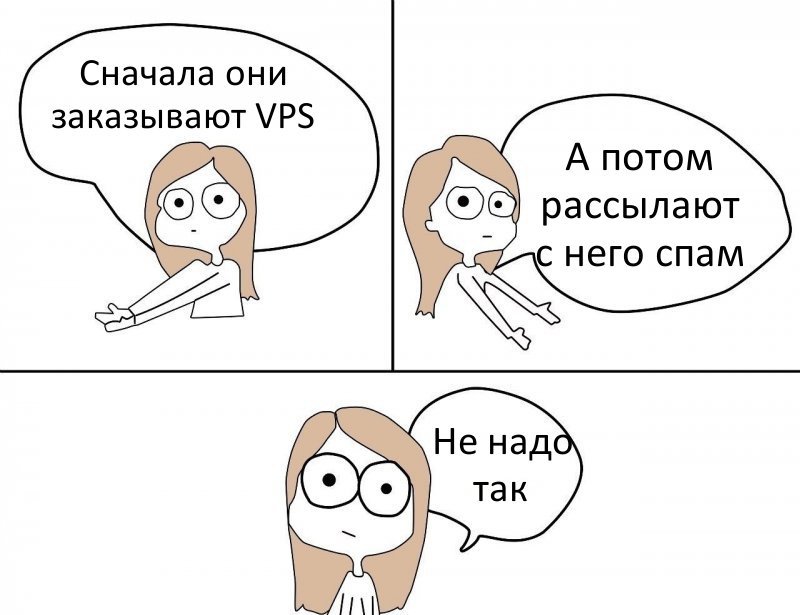
Sending spam from VPS servers is sure to upset the hosting provider and they will block your service
We sometimes come across VPS servers being used incorrectly. The result is problems with data loss, with the hosting provider or even with law enforcement.
Here are a few things you should not do if you rent a virtual server.
Keeping backups on the same VPS
It happens that a customer orders a VPS, works on it, makes backup copies and keeps them on that same server. That is a mistake, because the server may fail and as a result all the data, including the backup copies, will be lost.
Backups are worth making onto a remote VPS server, and it is even advisable that it should not be in the same data centre as the main working server. Then the probability of losing the data is minimal even if a large-scale accident happens in the data centre where the main VPS stands.
Traffic
A customer orders a virtual server and after some time the provider notices a sharp spike of traffic on the server. That means the customer did not estimate the needs of their project and is overloading the channel.
The bandwidth for each virtual server differs from one hosting provider to another, but on average it is 100 Mbit/s, and that is most often enough for an ordinary user.
However, if your project constantly has a high utilisation of the internet channel, it is worth warning the provider about it in advance. The provider will suggest the most suitable solution for your situation. For instance, you can order a dedicated channel for the server or order a dedicated server with suitable bandwidth and power.
Spam
Some users order VPS servers with an unseemly purpose — to send spam (unwanted mail).
Spam comes in different kinds — harmless and dangerous — and you can read about that in our article What spam is and how to fight it. But no matter whether the user of the server sends out advertising for miracle vitamins or letters with a virus, spam is stopped on any hosting: the service is blocked with no possibility of restoring it or getting the money back.
How to set up a VPS
For that you have to know how the chosen operating system and the services you need on it are configured. The provider will supply only the hardware and a preinstalled image of the operating system, as a rule without additional programs.
Or, instead of studying the operating system and its services yourself, you can use the services of administrators, who will set it up for you.
Conclusion
With a virtual server you can solve a multitude of tasks, both work-related and personal. Besides, a VPS server makes it possible to save on buying a dedicated server.
A VPS server can be set up to your taste: install the software you need on it, install an operating system, use it not for one task but for a whole range of them.
Of course, problems may arise while working with the server, especially if the user has no administration skills. But every question that comes up can be solved with the help of the hosting provider's technical support.
And what do you use VPS servers for, and what problems arise with them most often? Write in the comments!